
Chapter 14 · 14.1
The package page in My WebOké
You manage your WebOké Nextcloud in two places. In Nextcloud itself, you work with your files, calendar and contacts. Everything to do with your package, you arrange in My WebOké: users, Office licences, storage, updates and the AI Assistant. You do this on the package page.
Opening the package page
- Log in at mijn.weboke.nl.
- Go to My Products.
- Next to your Nextcloud package, for example Nextcloud Family or Nextcloud Max, click Administration.
Looking for something on the package page? Type it into the search bar of My WebOké, for example AI Assistant in Nextcloud.
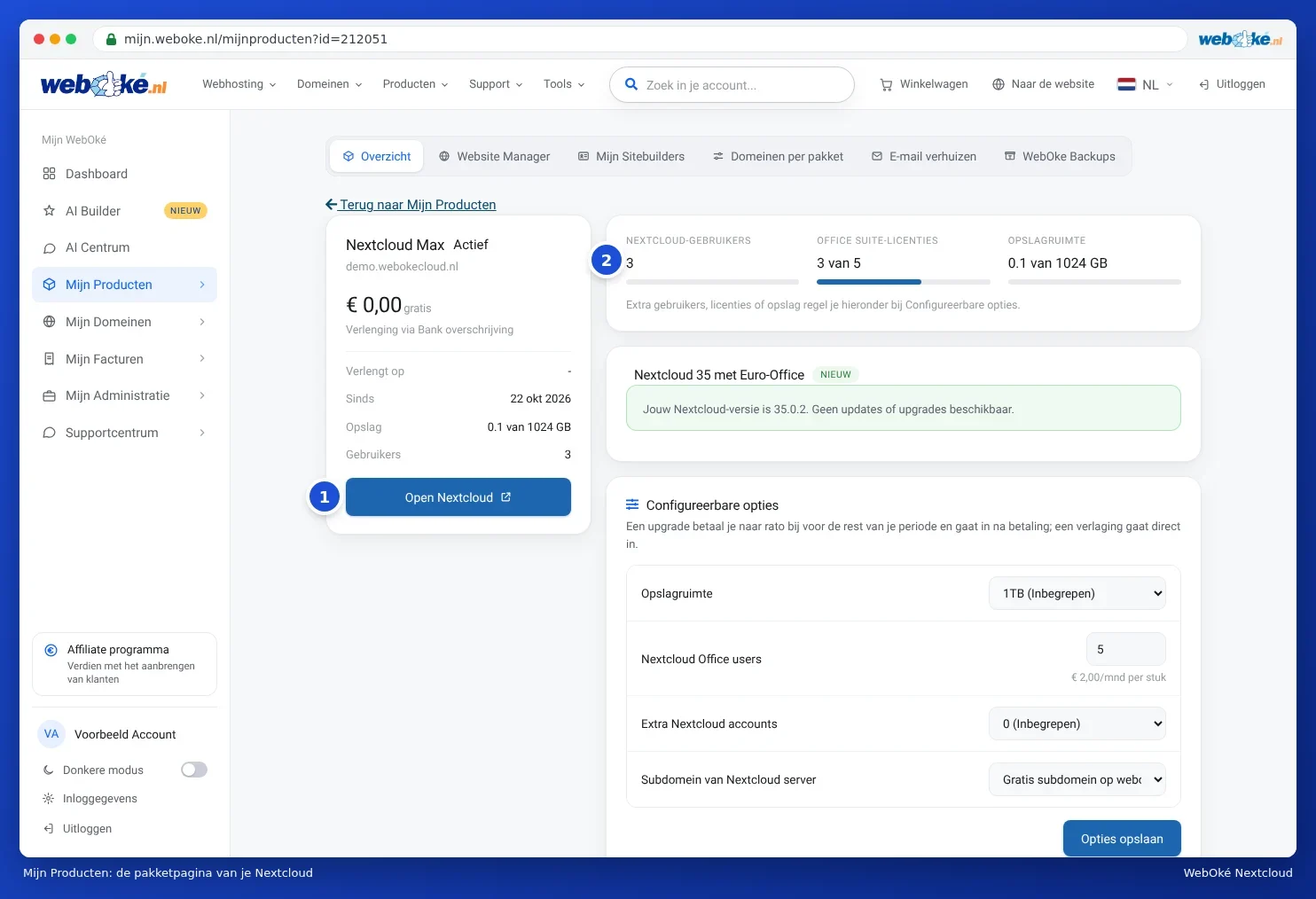
What do you see on the package page?
- Open Nextcloud (1): opens your Nextcloud in a new tab.
- The counters (2): Nextcloud users, Office Suite licences and Storage space. You see how much of what you have is in use, for example 3 of 5. You can add extra users, licences or storage under Configurable options.
- The card with your Nextcloud version: which version you have and whether a new version is ready for you. See Nextcloud updates: when and how.
- Configurable options: storage, Office licences, extra users (Max) and your address (Family and Max). See More storage or users, changing or cancelling your package and Your Nextcloud on your own domain (cloud.yourcompany.com).
- Change hosting package: switching to a different Nextcloud package. You see this card if another package is available to you. See More storage or users, changing or cancelling your package.
- User management: adding users, changing passwords and turning Office on or off. See Creating, editing, disabling and deleting users.
- AI Assistant in Nextcloud: turning on AI with your own API key. See AI Assistant in your Nextcloud.
- Cancel product and Transfer to another customer, at the bottom of the page.
Tip: the counters and the user list are fetched live from your Nextcloud. If you briefly see Fetching users…, just wait a few seconds. If you get the message The user list could not be retrieved, please refresh the page again later.
Nextcloud Free looks different
With Nextcloud Free, you have your own account on our shared Nextcloud. On the package page, you then see the card Your Nextcloud Free account, with your username, how much storage you're using, when you last logged in and the Nextcloud version. User management, Office and the AI Assistant aren't available with Free. Want more? Read From Nextcloud Free to a paid package, or from another Nextcloud provider.
Who can do what?
The package page is for the owner of the WebOké account. Some buttons only work for the owner, such as starting an update and turning the AI Assistant on or off. People who only have a Nextcloud account, such as your family members or colleagues, don't appear in My WebOké. They only work in Nextcloud. Read more about permissions in Permissions: who manages what in your Nextcloud?.